Author Archives: Merlin Halteman

Install Microsoft Office 2013 from a disc

I had a situation recently, where I had to install Microsoft Office 2013 on a computer that didn’t have internet access. Office 2013 is not sold with disc, but with a product key card. Here is how I managed to install Office 2013 completely offline. You will need Internet access one time to download the disc image of Office 2013, after you have the disc image you will be able to install Office completely offline on other computers.

Set up a Microsoft account for the customer. You can sign up here.

Next go to www.office.com/setup and sign in with your Microsoft Account.Offie Setup

Continue reading →

Warranty Claim for HTC One Google Play Edition

I purchased a GPE HTC One a couple months ago. Recently I had the unfortunate experience of my phone quitting on me. It wouldn’t turn on. I connected my phone to multiple chargers and verified those chargers were working, but it still wouldn’t power on. So I requested a warranty claim. Here is how I went about getting my warranty claim.

First off I “Googled” my issues and came up with this site.

I selected my device.

However, that site didn’t give me any information on how to contact Google, then I found this site . This website had support numbers for various countries. I called Google and got a helpful representative on the phone.

She stepped me through a couple troubleshooting steps to confirm the device was dead- it was. Once finished with the questions, she took my information and told me Google would Continue reading →

Broken iPhone home button? Here is a work-around. . .

Here is a work-around, if you had the misfortune of your iPhone’s home button breaking or wearing out on you.

Step One: Go to Settings.

iPhone Settings

Step Two: Select General. Continue reading →

Antivirus Security Pro Virus (Trojan.Agent.rfz) Removal Instructions

Monday Morning: Today I visited a customer that was infected with the “Antivirus Security Pro” virus. Our customer was using Windows Intune for antivirus protection on a Windows 7 computer. Here are a couple screenshots of the virus. It tries to pose as a legit antivirus program, when in fact it is infecting your PC. It then tries to make you pay for the antivirus software to fix all of “the problems” it is finding.

Antivirus Security Pro

Continue reading →

Windows Server 2012 Essentials: Cannot connect this computer to the server

The following post is more a documentation article for myself than a troubleshooting article, but if this post helps you, that is great! Here goes:

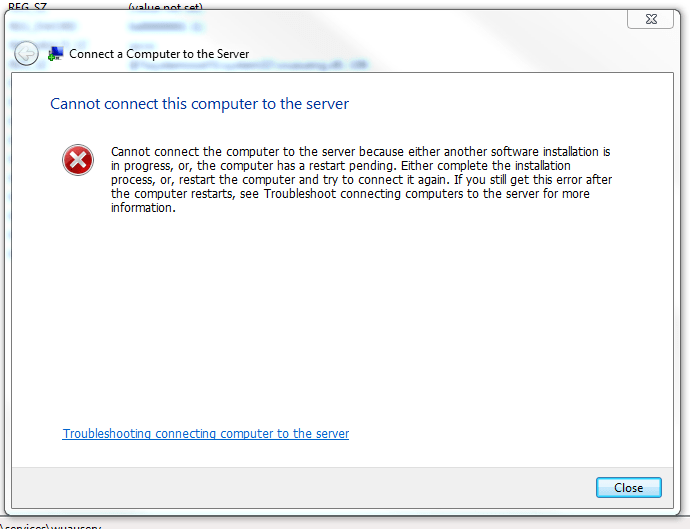
When I run the client connection program to join a client computer to Windows Server 2012 Essenstials domain sometimes I get this error:

Cannot Connect Computer

“Cannot connect the computer to the server because either another software installation is in progress, or, the computer has a restart pending. Either complete the installation process, or, restart the computer and try to connect it again. If you still get this error after the computer restart, see Troubleshoot connecting computers to the server for more information.” Continue reading →